
Compression, expansion, noise gate, threshold, ratio—what does it all mean? Should you use a software audio compressor like Chris's Dynamic Compressor, or a hardware compressor connected to your mixer? Also get an Audacity quick tip for seeing, at a glance, where your audio clips and distorts.
Understanding compressor terminology
- Compression—from the top down, sometimes from the bottom up
- Expansion—expands the range of low volume, opposition of compression, quiets small audio
- Gate—Opens and closes to allow or prevent audio
- Threshold—the point above which audio is compressed
- Ratio—how much to compress audio
- Peak limiter—hard wall to prevent audio from exceeding a volume
- Attack and release (hard and soft knee)—How fast to approach and dissolve the compression, “interactive knee” will change the attack and release speed depending on the input volume
Simple to complex compressors
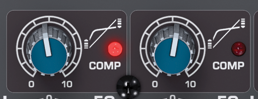
Levelator (free, standalone)—no options  Mixer-based compressor knob (built into some mixers)—just a single knob, like on my Behringer Xenyx X1832USB.
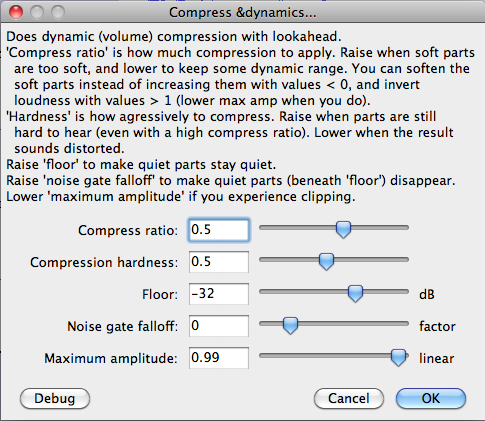
  Chris's Dynamic Compressor (free, standalone and Audacity plugin)—a few simple options, follow his instructions to unlock the advanced options
  Hardware compressor/limiter/gate ($80 and up, standalone device)—several knobs, some have more options than others. Such as my Behringer MDX4600 (currently $120).
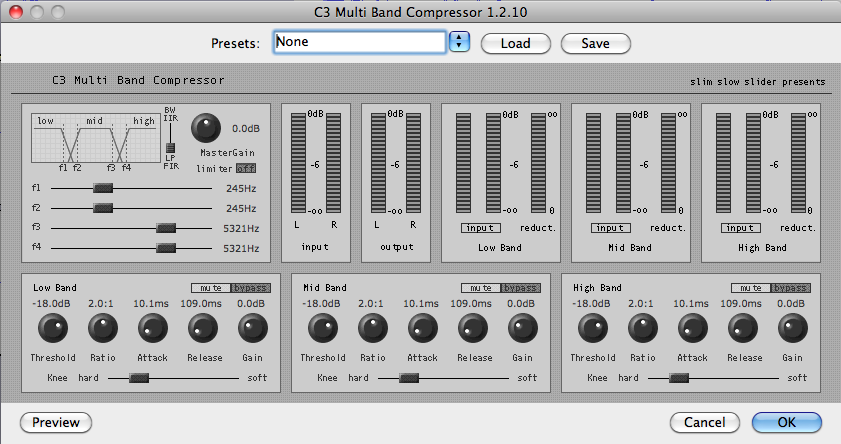
  C3 Multiband Compressor (free, plugin with Audacity edition) or Adobe Audition‘s Multiband Compressor (included plugin with $349 software)
Should you use a software or hardware compressor?
Robert from It's Just Us has a Alesis 3630 Compressor Dynamics Processor and Adobe Audition 2.0 and wanted to know whether he should use the hardware or software compressor. The short answer is that you have to decide for yourself based on the advantages and disadvantages that affect you.
Software compressor advantages
- Free
- Edit undestructively after recording
- Experiment with the same audio to see and hear changes
- Compress audio from any source: studio mics, field recordings, or sound clips
- Often has presets to reduce complexity
- Forward-looking compression
Software disadvantages
- Not real-time
- Extra steps
- Extra processing time
- Processes all or nothing
- The tools may change (Audacity, Audition, Soundbooth, Pro Logic, etc.)
Hardware advantages
- Channel isolation
- Individualized setttings for each host
- Preventing noise in other tracks
- Compressing only what you want (voices, not music)
- Process in real-time for fast turnaround
- Live audience benifits
Hardware disadvantages
- Expensive ($80 and up)
- May require other upgrades, such as getting a mixer with inserts
- Different settings depending on content
- Mistakes are baked into the recording
- No presets
Conclusion
If you're just starting out with audio compression, stick with a software compressor so you can learn as you experiment. Always keep and unprocessed archive of your recording. If you have extra money and want to optimize your workflow and have almost instant turnaround, get a hardware compressor.
Need personalized podcasting help?
I no longer offer one-on-one consulting outside of Podcasters' Society, but request a consultant here and I'll connect you with someone I trust to help you launch or improve your podcast.
Ask your questions or share your feedback
- Comment on the shownotes
- Leave a voicemail at (903) 231-2221
- Email feedback@TheAudacitytoPodcast.com (audio files welcome)
Connect with me
- Subscribe to The Audacity to Podcast on Apple Podcasts or on Android.
- Join the Facebook Page and watch live podcasting Q&A on Mondays at 2pm (ET)
- Subscribe on YouTube for video reviews, Q&A, and more
- Follow @theDanielJLewis
Disclosure
This post may contain links to products or services with which I have an affiliate relationship and may receive compensation from your actions through such links. However, I don't let that corrupt my perspective and I don't recommend only affiliates.
Related Content


This was a great episode – plenty of really good information to help make a more informed decision about the best approach to compression. I've been using Levelator for quite some time and I'm generally pleased with it. It's certainly a "no-brainer" when it comes to running it – just drag the wav file over it and let it go.
Doing the same for listener v-mails that come in through Google Voice is very helpful also. Lately I've started running a little noise removal on them first with Audacity, exporting them to a wav file, and then through Levelator. They sound clearer when I then play the v-mails during the show.
I *LOVE* Chris’s Dynamic Compressor! Thank you for telling me about this. I've been using it every since this episode of TAP aired. I would love to know if you have more of these type plug-ins that I could use to make my sound even better. I use Audacity all the time for my show (record to a digital recorder in WAV) to edit when/if necessary and I love learning how to use it better.
Thanks for taking time to do these shows. (Thanks to your wife, too.) –Allan
That's great to hear! I have on my list to review the latest version of Chris's Dynamic Compressor, and I've actually been trying to get Chris on the podcast sometime.
This next episode will be really fun!
https://theaudacitytopodcast.com/chriss-dynamic-compressor-plugin-for-audacity/ is how to install
And a comparison of the different compressors is at https://theaudacitytopodcast.com/tap065-audacity-compressor-showdown/
[…] is the first episode that didn’t utilize the Levelator but instead followed Daniel Lewis’s ( The Audacity to Podcast ) secret sauce recipe for great audio in audacity… more on that later!… stay tuned. The Bunker Project Meetup Door Prize – Bunker Project […]
How do you use Ubercasters compressor?
I just found your podcast, and I’m looking forward to learning more about podcasting. I have the Behringer Xenyx X1204USB. How do I determine what level to set the compressor at?
Also, has Audacity improved its compressor since you made this episode? I’ve been using it and haven’t had any problems. I’ve tried others (including Chris’s that you endorse here), but I keep going back to Audacity’s because I end up with the best results.
Thanks!
You have to just listen to yourself and see what sounds the best. Compression is an art and it’s different for every voice. If you don’t vary your volume much while speaking, you may not need much compression.
On single-knob compressors like the X1204USB, I recommend somewhere between 12 and 4 o’clock positions. Record some samples and listen back to them (you won’t hear the differences very well while you’re talking).
Is it possible to connect the MDX 4600 to a X1204USB mixer? It does not provide inserts and was curious about any creative solutions.
You can use the Aux Sends and Returns for that, but then you’re limited to only one channel.
Great explanation of difference of hardware and software. Best take away for many is ‘If you’re just starting out with audio compression, stick with a software compressor so you can learn as you experiment. ‘ – Just like digital photography may not be the best for fine art photography (or it may be) it blows away film for a learning tool.
Why are you saying that software compressors are not real time? Things like REAPER can easily do real time effects on the audio you send through it. You just need to setup the inputs and outputs correctly and with things like WASAPI under Windows you can get latency of like 10ms or less with REAPER easily. So yes, you can effectively do software compression (and all the other effects REAPER allows you to put on audio) in real time (even if you have picture included – lipsyncing is considered unnoticeable up to 22ms), this includes background noise filtration etc. And REAPER is just one example of it!
[…] 5. Podcasting with Software Compressors vs. Hardware … […]